Showing posts with label FYI. Show all posts

Dec 13, 2011

Couptivate: New Program that Organizes your Daily Deal Site Vouchers (Groupon, Plum District + More!)


I think I am going to love this program. I (or you?) won't forget what vouchers I have and where I got them from. It pulls daily deal sites (like Groupon, Plum District, Living Social, and more) together, so you can stay organized with all daily deals and deals you purchased. It even sends you email reminders so deals and coupons will never expire or go unused. 


Sep 27, 2011

FYI-- How to create a Facebook List

I believe some of you are having trouble or are unable to see my latest updates because Facebook has been making some new changes. Here is my step by step guide to help you create your own List on Facebook. The list will put a tab on the left hand side of your Facebook page. you will see ALL of the latest FreebiEasy updates (or any other freebie sites you liked) on the list. Before we start, make sure you "like" me on Facebook. Now, let's start. 


1. Hover over the “List” tab on the left side of your page. Then click where it says More


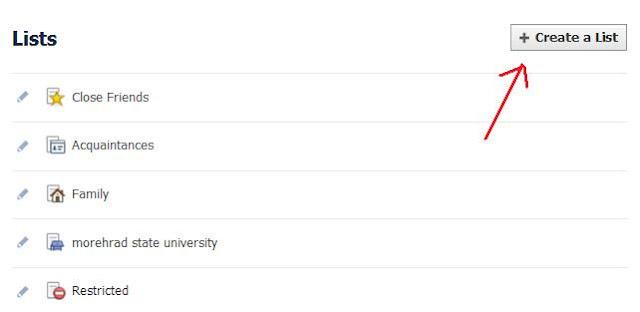
2. Click on “Create a List”


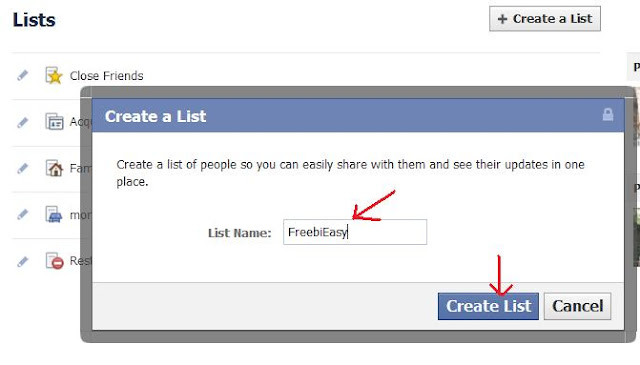
3. name your new list (you can name freebie sites or anything you want), then click o "create list"
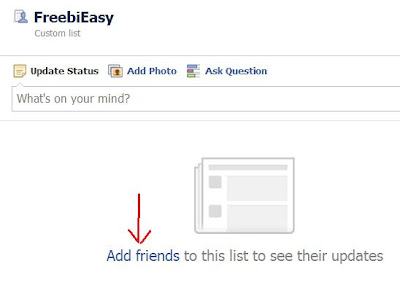
4. Click on “Add friends”


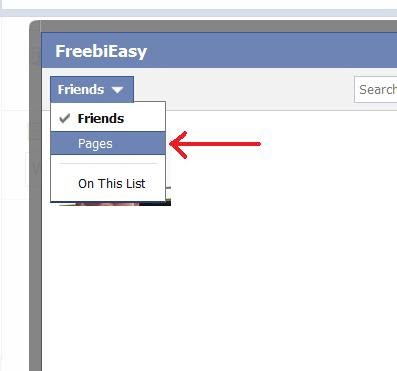
5. Click on the Friends Drop-down and check the “Pages”


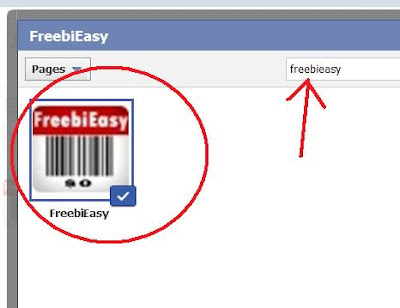
6.  Enter FreebiEasy in the search, then check the FreebiEasy Pages you have “Liked”.  You can also simply by scroll page down to click whatever pages you want to put into this list. Then click Done. 

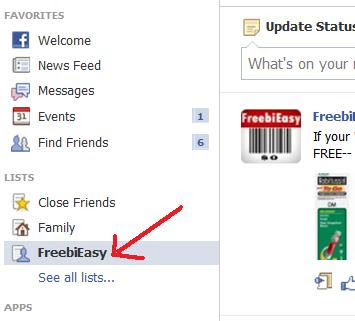
7. You have now just created a FreebiEasy tab under your list. To see all the latest my update just click the FreebiEasy tab. It's a good way to put all of freebie sites together and stay on this page for freebie update. ^_^ 


Jul 29, 2011

FYI-- Tax-Free Shopping Dates 2011


Tax-free shopping time coming up. Here's a list of states that will have a Tax Free Weekend and their respective dates:

Alabama – August 5 – 7

Arkansas – August 6 – 7

Connecticut – August 21 – 27

Florida – August 12 – 14

Illinois – August 6 -15

Iowa – August 5 – 6

Maryland – August 14 – 20

Mississippi – July 29 -30

Missouri -August 5 – 7

New Mexico – August 5 – 7

North Carolina – August 5 – 7

Oklahoma – August 5 – 7

South Carolina – August 5 – 7

Tennessee – August 5 -7

Texas – August 19 – 21

Virginia – August 5 – 7


Jul 21, 2011

FYI-- Remove Applications You’ve Allowed on Facebook

FYI-- Remove Applications You’ve Allowed on Facebook 

We all need to know how to remove applications we've allowed on Facebook. I like to delete applications after I submit the freebies forms. However, I suggest you to delete these applications on a regular basis, like once a week.
Now, follow me to delete these applications.  

Step 1: Go to your Facebook Account Page


 Step 2: Click on Privacy Settings from the pull-down menu

 Step 3: Look at the bottom left to click on Edit Your Settings under “Apps and Websites”

 Step 4: Click on Edit Settings


 Step 5: Click "X" in your list of application to delete it (You can keep some applications you trust and usually used.)


 Step 6: Click on "Remove" to delete it. 

The go beck to Step 5 to delete another application you want to delete. 


Jul 3, 2011

How to make sure every FreebiEasy's post is showed on your FB newsfeed

You missed some great freebies because my posts did not show up on your Facebook newsfeed? 
Here is how you can do to make sure my every single post shows up. 
Just follow my pictures' direction, then the problem should be solved.